AI UGC for TikTok Shop: Avatar Ad Examples, Steps and Costs
AI UGC can supply the talking-head part of a TikTok Shop product video, but the examples here are not ready to post unchanged: both have warped hands and incorrect product text. Kubflow's 92 ready-made AI creators speak your script; pair the creator footage with checked product b-roll rather than treating it as a real customer's testimonial. Our generated still and b-roll cost 80 credits together; the avatar and finishing costs are additional.
This post reviews two earlier avatar ads and a separate blender still and b-roll experiment. We have not combined them into a finished TikTok Shop ad. The blender assets cost 80 credits, about $0.88 at Growth's approximate credit rate; that excludes an avatar video, finishing and any additional generations.
Does this AI UGC look ready to post?
The format we're examining is a creator speaking to camera, a product shown close up and a short buying message. The two examples below demonstrate the look, not sales performance. We haven't run conversion tests or measured production time against human creators.
Both ads below were made with Kubflow UGC Avatars on 2026-10-01, before this post. We didn't make them for this test, and they're shown as examples of real output.
Failure example: not approved for posting.
The first is an ad for CHOC CREAM, a made-up ice cream brand. It's vertical and shot to look like a handheld selfie in one take: a woman in a beige knit sweater holds a matte green tub in a warmly lit living room and leans toward the camera to talk. The background stays consistent from frame to frame. Two things went wrong. The tub reads "CHOCRE", then drifts to "CHOCREA" instead of CHOC CREAM, and the hand holding it is warped, with fingers that are indistinct at first and merged later on.
Failure example: not approved for posting.
The second is a beauty review. A blonde creator in a white cardigan holds a small glass bottle up to the camera, with subtitles reading "Okay, wait.", "literally glass" and "in a bottle." The request was an unbranded lip oil, but the bottle says "ROSIE". Her right hand is badly warped and the fingers melt into the glass. The face, hair, clothes and bedroom background hold steady throughout.
The framing and settings resemble creator content, but neither example passes our product-detail check. Before publishing, compare every visible product feature and label with your actual item and listing, then verify the current TikTok Shop requirements separately.
What you need before you start
- A clean product photo, or a product still you generate (Step 1).
- A 15 to 30 second script with one hook, one benefit and one call to action that sends people to your TikTok Shop listing.
- A Kubflow account. There is no free plan, but a new account gets 5 image tries, 1 video try and 1 Trend video try; the Trend carries a "Made with Kubflow" watermark. Generation after those tries requires a paid plan. Plans start at $19 a month; Growth is $49 a month for 4,500 credits, about $0.011 per credit. See plans and what a credit buys.
Step 1: Make a product still that reads on a phone screen
We generated a product still with Nano Banana Pro from a text prompt alone, with no start image, at 1K and 16:9. It cost 19 credits, about $0.21 on Growth. The product is a made-up mint portable blender, so this is a demonstration of the style rather than a real listing photo.
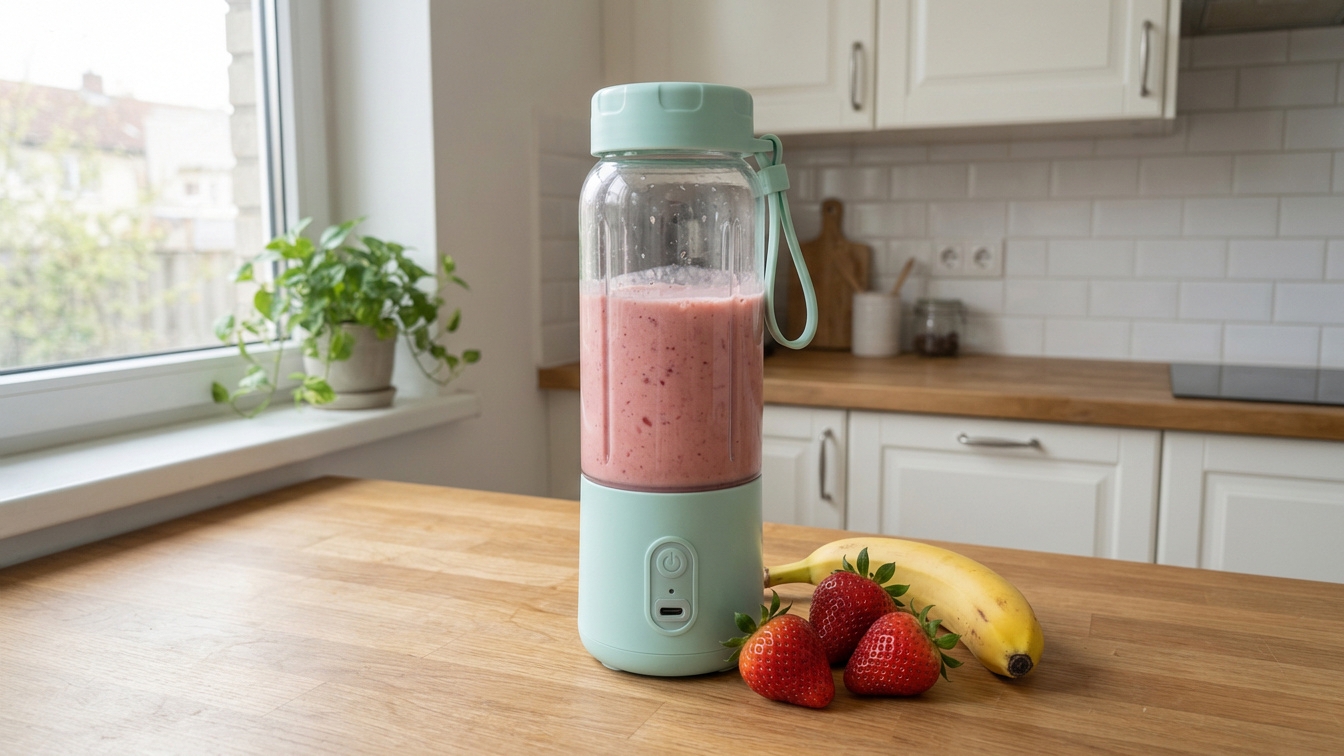
A realistic phone-camera style product photo of a pastel mint portable USB-C blender bottle standing on a light wood kitchen counter, a few fresh strawberries and a banana beside it, the clear jar half filled with a pink smoothie, soft morning window light from the left, slightly casual framing like a creator filmed it at home, the blender large and sharp in the center of frame, background a softly blurred white kitchen with a plant, natural colors, no text, no logo
The model followed the prompt closely. The blender stands in the center of a light wood counter, half full of pink smoothie, with strawberries and a banana next to it, window light from the left and a blurred white kitchen with a plant behind. There's no text or logo. The flaws are small: the USB-C port is an odd shape, the strap meets the lid awkwardly, and the window frame doesn't line up with the sill.
Each choice in the prompt has a job. A plain home kitchen and soft window light look like something a creator filmed, not a glossy studio ad, so the still sits comfortably next to an avatar clip. Keeping the product large and sharp in the frame means it still reads on a small screen.
For your own product, don't rely on a text prompt alone. Nano Banana Pro accepts up to 8 reference images, so give it your real product photo as the first reference and type the label text into the prompt. Its prompt guide also prefers positive phrasing, for example "a plain counter" rather than "no clutter". Our prompt broke that rule with "no text, no logo", and it worked here. Nano Banana Pro is also the image model that looked most real in our side-by-side test on 2026-10-15.
A frame grabbed from a vertical phone video filmed at home. The [PRODUCT] from the first image stands large and sharp in the center of a light wood kitchen counter, its label reading "[LABEL TEXT]" exactly as in the reference. Beside it sit [ONE OR TWO PROPS]. Soft morning window light comes from the left. The framing is slightly casual, as if a creator set the phone down and hit record, and behind the product is a softly blurred white kitchen with a single plant. Natural colors, a clean uncluttered counter, the product exactly as it appears in the reference.
For drafts, Nano Banana 2.1 costs 5 credits per 1K image against Pro's 19. Its prompt guide rates it about as good as Pro, it takes up to 10 references, and the same prompt pattern works. If you need more angles and settings, see studio and lifestyle product shots from one photo.
Step 2: Pick an AI creator and write the script
UGC Avatars has 92 premade AI creators who speak the script you give them. Choose the one your buyers would believe. That comes down to age, style and setting: a skincare product for students suits someone in a dorm-style bedroom, and a kitchen gadget suits someone at a counter. If you're unsure, run two creators on the same script and let the numbers decide.
The two example ads point to a script pattern:
- Start on a reaction or on the product within the first second. The lip oil ad opens with "Okay, wait.", which works as a hook before anything is explained.
- Keep each line to one short claim. "literally glass" and "in a bottle." are separate beats, and that's why they read well as subtitles.
- Only make claims you can back up. The creator has never used your product.
- Finish with one call to action that sends viewers to the product link in the video.
Script template, not used in the examples: "Looking for [PRODUCT CATEGORY] with [VERIFIED FEATURE]? This is [PRODUCT NAME]. Here is [REAL PRODUCT DETAIL] up close. If [VERIFIED USE CASE] is what you need, check the product link for the specifications and current price."
Replace every bracket with a verified detail. Do not add first-person use claims or results the AI creator cannot substantiate.
Kubflow shows the exact credit price of every generation before it runs, and that includes UGC Avatars videos. We didn't make a new avatar video for this post, and we don't give a cost for the two examples above. Write down the price you're shown before you generate, and put it in your own cost table (template below).
Step 3: Add product b-roll between talking-head lines
We animated the still from Step 1 with Seedance 2.0 Fast, using it as the start image. The clip is 5 seconds at 480p and 16:9 with audio generation off, and it cost 61 credits, about $0.67 on Growth.
Failure example: not approved for posting.
The camera slowly pushes in toward the portable blender as the blades start spinning and the pink smoothie swirls inside the jar, a hand enters from the right and taps the button on the base, gentle handheld sway like a phone recording, the window light stays soft and steady, the strawberries stay still on the counter
Most of it worked. The camera pushes in slowly, the smoothie spins into a vortex, the light stays steady, and the counter and background remain consistent. The hand didn't work. We asked for a hand to come in and tap the button, but what appears in the first frame is a blurry, distorted hand that points vaguely at the base and then disappears without tapping anything. The reviewer also flagged a banana the motion prompt didn't mention, which came from the start image.
For the next attempt, we would test a product-only shot without human interaction; we have not generated that revision. Your avatar already provides the human in the ad, so the product clip only needs the product and one camera move. The opening contains a faulty hand interaction. Inspect the entire clip before deciding whether a trimmed section is usable; we have not demonstrated a clean edited version here. For TikTok, generate the still and the clip in the same vertical aspect ratio as your avatar video so the cuts match. The recorded still and clip are both 16:9; this experiment does not demonstrate a finished vertical edit.
One continuous shot. The camera slowly pushes toward the [PRODUCT] standing alone on the counter, with only the product and props visible throughout. [ONE SIMPLE PRODUCT ACTION] happens while the window light stays soft and steady and the props stay still. No subtitles, no logo, no watermark.
Following the Seedance 2.0 Fast prompt guide, keep one camera move per shot, write it as shots rather than timestamps, and leave generate_audio off for a silent clip that you'll put sound on later.
Assemble and finish
- In a video editor, place the creator's hook first, continue the benefit line as audio over the product b-roll, then return to the creator for the CTA. Review the joins for visual and audio continuity.
- Stitch Videos can join prepared clips without re-encoding. It is a joining step, not a substitute for demonstrating the speech-over-b-roll edit described above.
- Add Subtitles transcribes the speech with ElevenLabs speech-to-text and burns the captions in with FFmpeg.
- Add Audio mixes up to 5 audio tracks onto a video, with volume per track. Suno can make the background music.
We haven't run these finishing steps on the clips in this post. Each one shows its price before it runs.
Recorded asset costs: not a complete UGC ad price
Here's what we actually paid, plus the lines you'll fill in yourself. Dollar figures use Growth's rate of about $0.011 per credit. The records supplied here cover one still and one b-roll clip. They do not establish a full production budget or rejection rate. Include every charged attempt when calculating your own cost per usable ad.
| Item | Model | Settings | Credits | About on Growth |
|---|---|---|---|---|
| Product still (m1) | Nano Banana Pro | 1K, 16:9, prompt only | 19 | $0.21 |
| Product b-roll (m2) | Seedance 2.0 Fast | 5 s, 480p, 16:9, no audio, start image m1 | 61 | $0.67 |
| Made for this post | 80 | $0.88 | ||
| Each b-roll rerun if you reject a take | Seedance 2.0 Fast | Same as above | 61 | $0.67 |
| Cheaper draft still | Nano Banana 2.1 | 1K | 5 | $0.06 |
| AI creator video | UGC Avatars | Your script | Shown before it runs | Your number |
| Subtitles, audio, stitching | Add Subtitles, Add Audio, Stitch Videos | Optional | Shown before it runs | Your number |
To compare with human creators, put your own quotes next to this table: the fee per video, the cost of the sample, shipping, and the days you wait. We're not going to guess creator rates. Compare your recorded AI generation and editing costs with the creator's actual quote, sample and shipping expenses, delivery schedule and revision terms. This post has not measured a time or cost advantage over human creators.
Where you still need a human
- Product truth. The AI creator has never touched your product. Every claim in the script has to be one you can back up, and the product on screen has to match the listing.
- Platform rules. Before you post, check TikTok's current policy on labeling AI-generated content and TikTok Shop's rules on ads and claims. We don't restate them here because they change.
- Picking winners. A media buyer still has to read the results and decide which hooks get more budget.
- Proof. Unboxings, long-term use and real before-and-afters need real people. AI UGC is for volume and for testing angles.
Before posting: verify the script's claims, compare the product and label with the listing, inspect hands and product interactions throughout, check captions, and review current platform requirements.
Faster routes: Auto ads and Clone ad
If you'd rather skip scripting, Auto ads builds a finished video ad from a website, product photo or one sentence. If you already have an ad that performs, Clone ad remakes a winning ad for your own product.
If you're comparing dedicated AI UGC tools, our Arcads vs Kubflow comparison was checked on 2026-10-27.
Questions
Is AI UGC allowed on TikTok Shop?
Check TikTok's current AI-content labeling policy and TikTok Shop's ad and claim rules before you post. They change, so go by the official pages rather than any blog summary, this one included.
How much does an AI UGC video cost on Kubflow?
For this post, the product still cost 19 credits and the 5-second b-roll clip cost 61 credits, about $0.88 together on Growth. The UGC Avatars video itself shows its exact price before it runs, so add that figure and any reruns to your total.
Do AI UGC actors look real enough to post?
In our two examples, the framing, setting and delivery read as creator content, but the hands holding the product were warped and the product text came out wrong. Before posting: verify the script's claims, compare the product and label with the listing, inspect hands and product interactions throughout, check captions, and review current platform requirements.
Can I try it for free?
There's no free plan. A new account gets free tries of 5 images, 1 video and 1 Trend video, and after that you need a paid plan, which starts at $19 a month.
Which AI creator should I pick?
Choose the creator and setting your buyers would recognize as one of them. If you're unsure, run two creators on the same script and keep the one that performs better.