How to Turn a Product Photo into a Video Ad with AI
To turn a product photo into a video ad with AI, upload a clean product still as the start frame of an image-to-video model like Kling 3.0 or Seedance 2.0, write a short prompt that only describes motion, then add music, voiceover and captions. On Kubflow, one product shot plus one 5-second clip cost us 80 to 92 credits, which is about $0.88 to $1.01 on the Growth plan. Below we take the same still and the same prompt through both models and show what each one produced.
What you need before you start: one clean product photo
In image-to-video, the start frame matters more than anything else. The model keeps the product's shape, colours and label from that first frame and only adds motion. A clear, well-lit still with the product near the centre and some space around it gives the camera room to move without cropping the product.
If you don't have a good shot, generate one. We made the start frame for this test with Nano Banana Pro at 16:9 and 1K resolution, for 19 credits. More options for studio and lifestyle shots are in our guide to AI product photography.
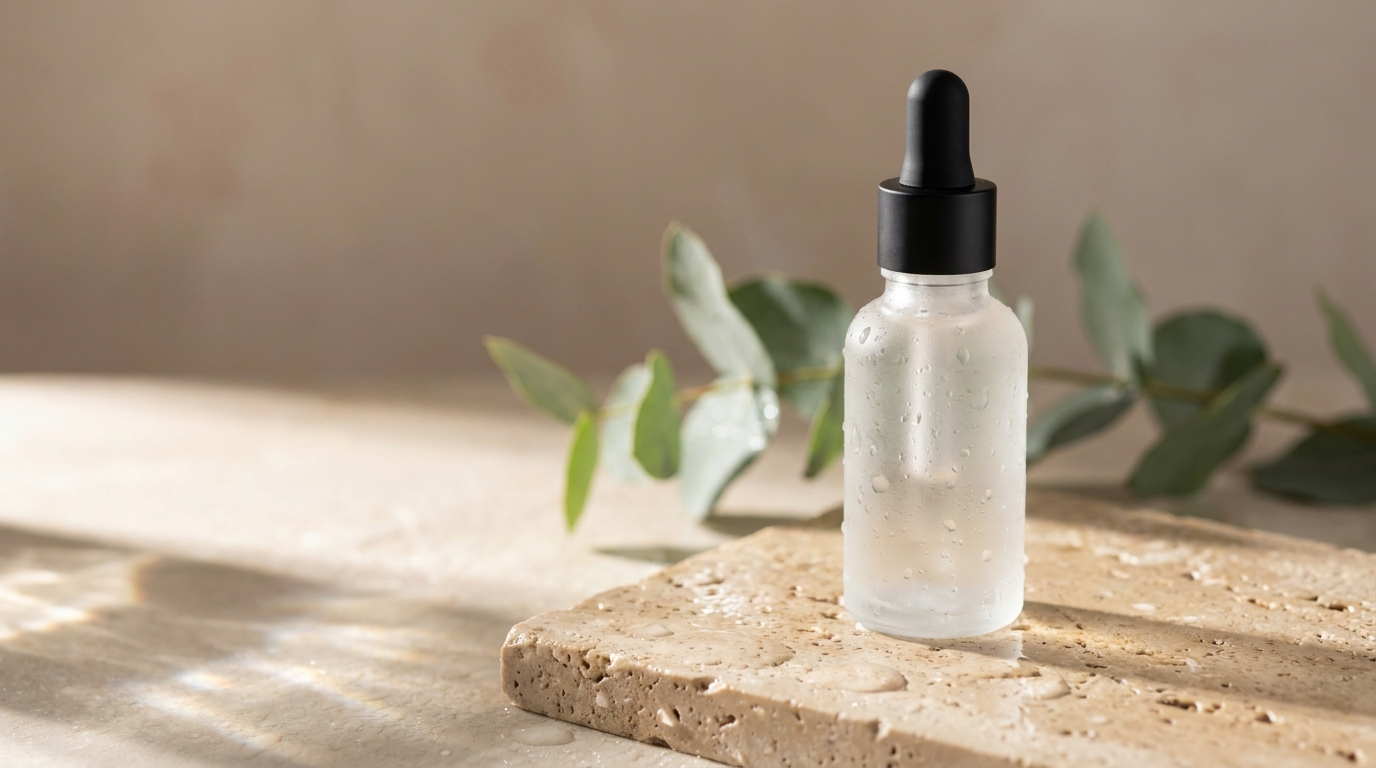
Commercial product photograph of a frosted glass skincare serum bottle with a matte black dropper cap, standing on a wet slab of pale travertine stone. Soft morning sunlight from the left casts long, gentle shadows and makes small caustic highlights through the glass. A few water droplets on the stone and a sprig of green eucalyptus behind the bottle, slightly out of focus. Clean warm-neutral background, shallow depth of field, crisp detail on the glass texture, premium minimalist beauty brand aesthetic, photorealistic.
It followed the prompt closely: frosted glass, a matte black dropper, wet travertine, light from the left and a soft-focus eucalyptus branch behind the bottle. The eucalyptus came out as a full branch rather than a small sprig, which still works. There is no label, so text rendering wasn't tested here. If your product has a label, type the exact wording into the prompt.
Commercial product photograph of [YOUR PRODUCT, e.g. an amber glass candle jar with a wooden lid] standing slightly right of centre on [SURFACE, e.g. a slab of light oak]. Soft morning sunlight from the left casts long, gentle shadows across the surface. A few [PROPS, e.g. dried lavender stems] sit behind the product, slightly out of focus. Clean warm-neutral background with open space around the product, shallow depth of field, crisp detail on the material texture, premium minimalist brand aesthetic, photorealistic, shot on a 85mm lens at f/2.8.
Already have a photo? Clean it up first. Remove Background cuts the product out (PNG, JPG or WebP, up to 5MB and 4096px) so you can put it in a new scene, and Topaz Image Upscale upscales it 1x, 2x, 4x or 8x (inputs up to 10MB) so it stays sharp when the camera pushes in.
Step 1: Write a motion prompt, not a scene prompt
The image already sets the scene, so don't describe the product or the background again. The prompt only needs to say what moves: the camera, the light and any small details around the product. Here is the exact motion prompt we gave both video models:
Slow, smooth camera push-in toward the serum bottle. Sunlight shifts gently across the stone, and the caustic highlights through the glass shimmer softly. A single water droplet slides down the side of the bottle. The eucalyptus leaves sway slightly in a light breeze. The bottle stays perfectly still and in sharp focus throughout.
In hindsight, this prompt asks for too much. Besides the camera move, it asks for four separate motions: shifting light, shimmering caustics, a sliding droplet and swaying leaves. Neither model managed all of them, and the extra motion is where the mistakes showed up. The rule we'd follow next time: one camera move, one subject action, and a line telling the model to keep the product still and sharp.
- Pick one camera move: push-in, slow orbit, pull-back or a slow pan.
- Pick one action: steam rising, a droplet sliding down, fabric moving, a hand coming into frame.
- Always add a hold line such as "the product stays perfectly still and in sharp focus" so the shape and label stay unchanged.
- For Kling, start with "One continuous long take without any cuts" so you get a single shot.
Step 2: Pick a model — Kling 3.0 vs Seedance 2.0 Fast on the same photo
Both clips below use the same start frame and the same prompt, are 5 seconds long at 16:9, and have sound turned off. Nothing changed between the two runs except the model.
Kling 3.0: 73 credits, 5 s, 720p (std mode)
Slow, smooth camera push-in toward the serum bottle. Sunlight shifts gently across the stone, and the caustic highlights through the glass shimmer softly. A single water droplet slides down the side of the bottle. The eucalyptus leaves sway slightly in a light breeze. The bottle stays perfectly still and in sharp focus throughout.
Kling 3.0 gave us the more usable clip. The push-in is slow and smooth, the bottle stays sharp, and the bottle, stone and shadows match the start frame from start to finish. The leaves move a little, like a light breeze. It wasn't perfect, though. The light and caustics never shift, the bottle keeps its many static condensation drops instead of showing one sliding droplet, and the one droplet that does move, on the left edge, seems to lift slightly off the glass. You'd only spot that if you looked closely. Kling 3.0 also supports a first and last frame, and pro mode renders at 1080p.
Seedance 2.0 Fast: 61 credits, 5 s, 480p
Slow, smooth camera push-in toward the serum bottle. Sunlight shifts gently across the stone, and the caustic highlights through the glass shimmer softly. A single water droplet slides down the side of the bottle. The eucalyptus leaves sway slightly in a light breeze. The bottle stays perfectly still and in sharp focus throughout.
Seedance 2.0 Fast kept the bottle's shape, the focus and the overall layout, and it made a subtle push-in. But the leaves and light don't move at all, and the droplet is where it goes wrong. Between the middle and the end of the clip, a large, unnatural blob of water slides down the centre of the bottle and hardens into a glass-like mass at the base. The caustics also sit on the left side of the frame, even though light coming from the left should throw them to the right. For a product ad, a melting bottle is a reshoot.
| Kling 3.0 | Seedance 2.0 Fast | |
|---|---|---|
| Cost for this clip | 73 credits | 61 credits |
| Resolution used | 720p (std) | 480p |
| Camera push-in | Smooth, clearly visible | Subtle |
| Product shape held | Yes, consistent throughout | Mostly, but a droplet morphs into a solid mass at the base |
| Leaves swaying | Slight movement | Static |
| Light/caustics shifting | Static | Static, and caustics fall on the wrong side |
| Usable as an ad shot | Yes | Needs a rerun or a simpler prompt |
Seedance 2.0 Fast still has a place. It accepts reference images, video and audio inputs, can generate audio, and costs less per clip. Its own guide recommends shots instead of timestamps, one camera move per shot, and generate_audio set to false when you want silence. Based on this test, we'd give it simpler prompts without small moving liquids. If you're testing a lot of ideas, Seedance 2.0 Mini costs 20 credits for a 5 s clip at 480p. It's good for checking a motion idea before paying for a final render, but don't use it for people talking, because its lip sync is weak.
One continuous long take without any cuts. Slow, smooth camera push-in toward the [PRODUCT]. [ONE ACTION, e.g. a thin wisp of steam rises from the cup]. The [PRODUCT] stays perfectly still, unchanged and in sharp focus throughout, with its label fully legible. Soft, steady light from the left as in the start frame.
Veo 3.1, Wan 3.0, Grok Video and other models are also worth trying on the same still. See image to video for the full list, or compare prices on the models page.
Step 3: Turn the clip into an ad with sound and captions
A silent 5-second clip isn't an ad yet. These tools turn it into one:
- Music: make a track with Suno (AI music for videos).
- Voiceover: write a short script and voice it with ElevenLabs TTS (AI voiceover generator).
- Add Audio: mixes up to 5 audio tracks onto the video, with volume for each track and normalising.
- Add Subtitles: transcribes the voiceover automatically and burns the captions onto the video, for viewers watching with sound off.
- Stitch Videos: joins several clips (for example a push-in, an orbit and a packshot) into one video without re-encoding.
If you sell more than one product, build these steps once in Workflows. It's a node canvas where the still, the video model, the voiceover, the audio mix and the captions are linked together, so you can swap in a new product photo and run the whole chain again.
What does one product video ad cost?
| Step | Kling 3.0 route | Seedance 2.0 Fast route |
|---|---|---|
| Product still (Nano Banana Pro, 1K) | 19 credits | 19 credits |
| 5 s clip | 73 credits | 61 credits |
| Total before audio | 92 credits (about $1.01) | 80 credits (about $0.88) |
Dollar amounts use the Growth plan: $49 a month for 4,500 credits, about $0.011 per credit. Music, voiceover and caption steps add to the total, and Kubflow shows the exact price of every generation before it runs, so you can check each step first. Plans start at $19 a month, and bigger plans pay less per credit. There's no free plan, so generating needs a paid plan. See plans and pricing.
When to skip the manual steps: Auto ads and UGC Avatars
Doing it step by step gives you control over every shot. Sometimes you just need lots of finished ads. For that:
- Auto ads builds a finished video ad from a website, a product photo or one sentence, and Brand kits keep your look consistent.
- Clone ad remakes an ad that already works, for your own product.
- UGC Avatars gives you 92 premade AI creators who speak your script, for testimonial-style ads.
Make it by hand when you want full control of each shot. Use Auto ads when you need many variations fast.
Questions
Can AI turn a product photo into a video?
Yes. Image-to-video models like Kling 3.0 and Seedance 2.0 use your photo as the first frame and add camera and product motion from a short text prompt. A clean, well-lit still with the product centred gives the best results.
Is Kling or Seedance better for product videos?
In our test with the same photo and prompt, Kling 3.0 kept the product consistent and moved the camera smoothly. Seedance 2.0 Fast turned a water droplet into an unnatural solid blob. Seedance 2.0 Fast is cheaper per clip (61 vs 73 credits for 5 s) but ran at 480p versus Kling's 720p.
How much does an AI product video ad cost?
On Kubflow, our example cost 19 credits for the product still plus 73 credits (Kling 3.0) or 61 credits (Seedance 2.0 Fast) for a 5-second clip. That's about $0.88 to $1.01 on the Growth plan before audio. Every generation shows its exact price before it runs.
What should I write in an image-to-video prompt?
Describe only the motion: one camera move, one small action and a line telling the model to keep the product still and in focus. The image already sets the scene, and adding several extra motions makes errors more likely.
Is there a free way to try this on Kubflow?
No, Kubflow has no free plan and generating needs a paid plan. Plans start at $19 a month.