How to Make an AI Influencer and Put It in Trending Videos
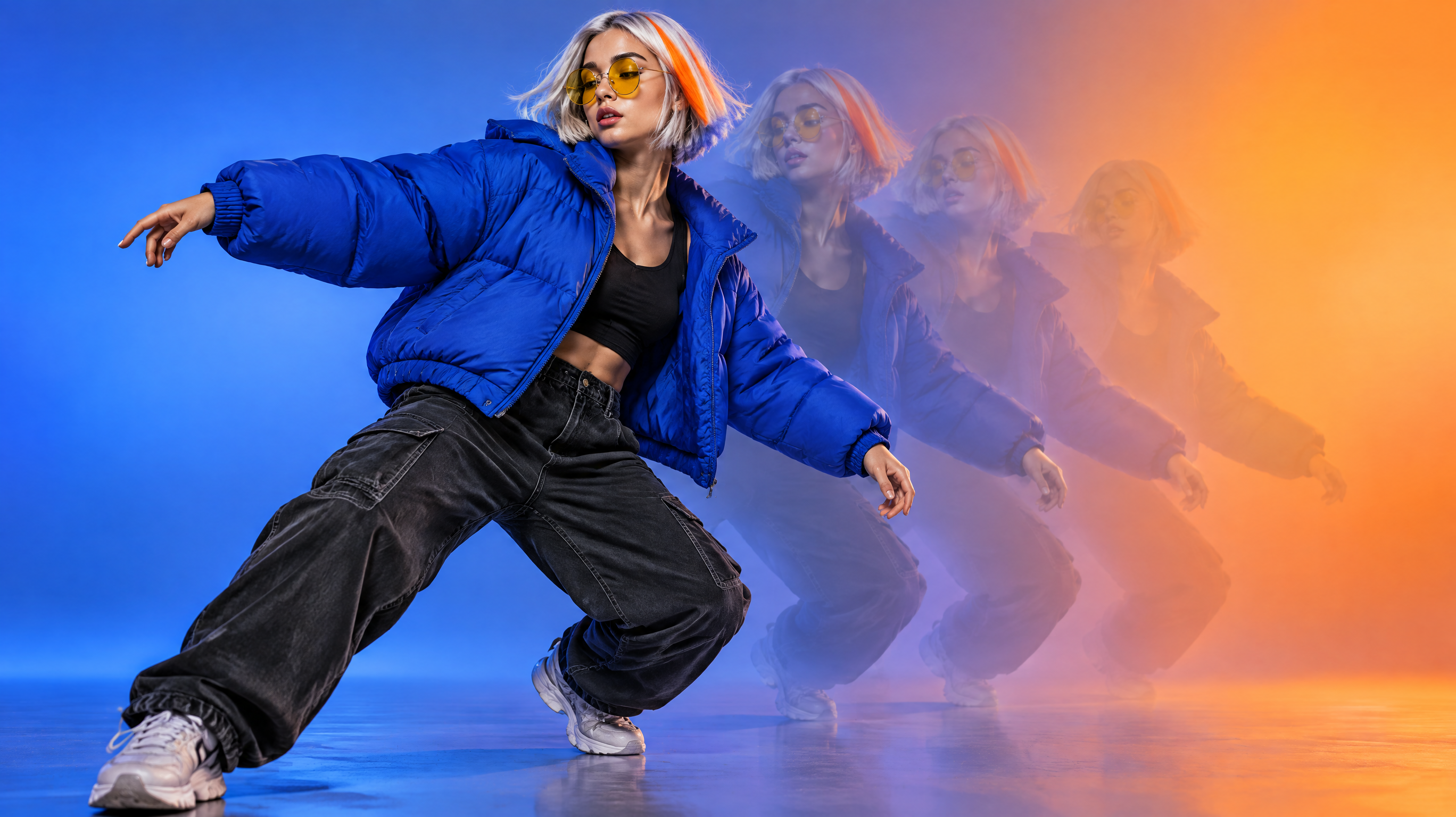
To make an AI influencer, design one fictional character with 2-4 signature features, generate a full-body master image, reuse that image as the reference for every new scene, then move the character with a dance clip you own using Kling 3.0 Motion Control. Below we build one character from scratch. You'll see every real output, the exact prompts, what each step cost (215 credits in total) and where the results fell short.
What makes an AI influencer recognizable?
People scroll past faces. What they remember are a few features they can spot at thumbnail size. A good rule of thumb is to pick 2-4 signature features, such as a hairstyle, eyewear, one hero garment or a color, and keep everything else simple so those features carry the identity.
- Choose features that still read when the image is small and the character is moving.
- Describe them with the same words in every prompt.
- Make the character fully fictional. Don't base it on a real person or a celebrity.
Our example character has four signature features: a silver bob with one neon-orange streak, round yellow-tinted glasses, an oversized cobalt-blue puffer jacket, and freckles.
Step 1: Design the character as a full-body image
Start with a full-body shot on a plain background. This image becomes the reference for every later scene and the character input for motion control, so it needs the whole outfit visible, arms clear of the body, and nothing in the background to distract the model. We made it with Nano Banana Pro for 19 credits (one 1K image, 16:9).
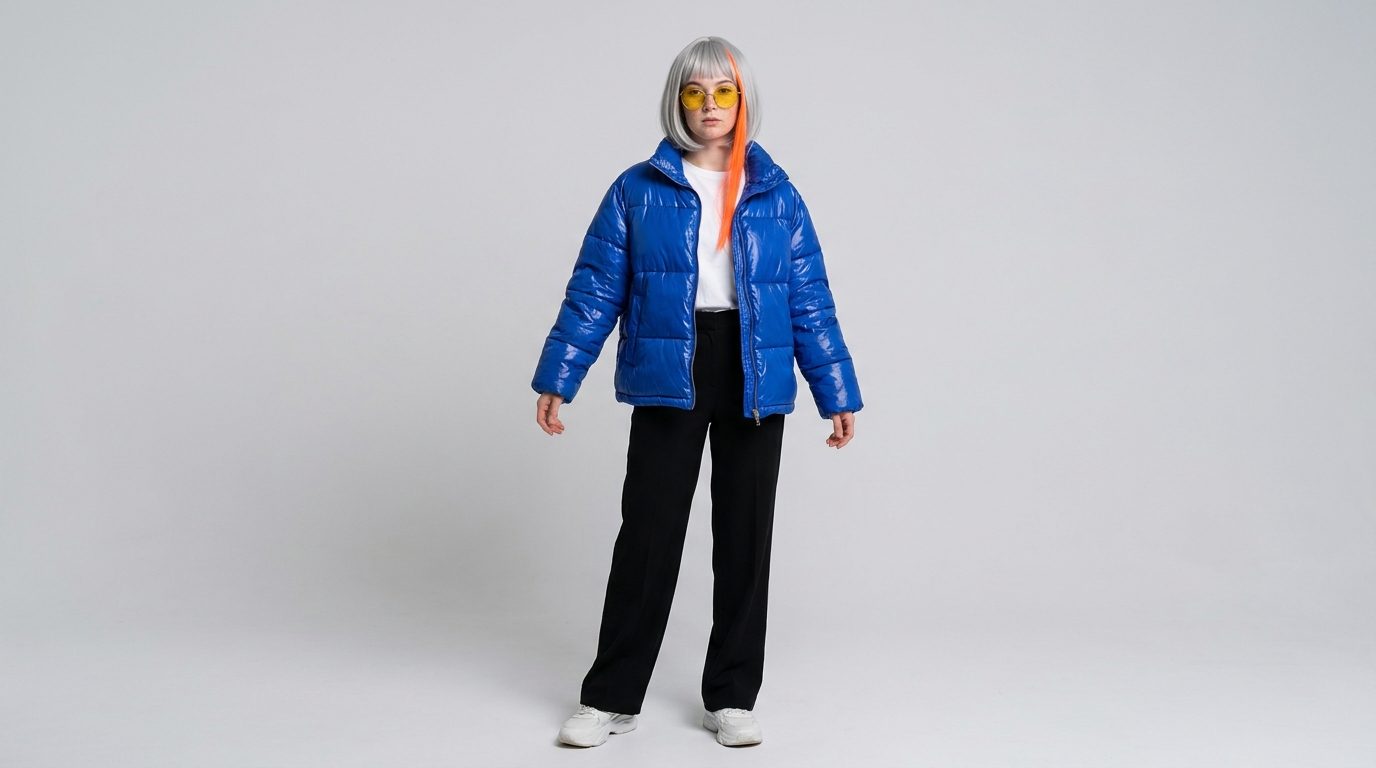
Full-body photo of an original fictional young woman standing in a relaxed neutral pose, arms slightly away from her body, facing the camera. Signature features: a sleek chin-length silver bob with one bold neon-orange streak at the front, round yellow-tinted retro glasses, a light dusting of freckles, and an oversized glossy cobalt-blue puffer jacket over a white tee, with black wide-leg trousers and chunky white sneakers. Plain light-grey studio backdrop, soft even lighting, sharp detail, photorealistic, entire body from head to shoes in frame.
The result is close. The silver bob with its orange streak, the yellow glasses, the glossy cobalt puffer and the head-to-toe framing all came out as asked. One thing didn't: the trousers look straight-leg instead of wide-leg. The freckles are there but faint, so they won't read at thumbnail size. For a master reference, the features that matter most at a glance held up, so we kept it.
- List the signature features first and in a fixed order, and reuse that exact wording later.
- Ask for a neutral standing pose with the arms slightly away from the body. Motion control works better when the limbs are easy to read.
- Write the prompt as a flowing description, not a keyword list.
- Save the image you pick as your master reference and don't overwrite it.
Full-body photo of an original fictional [AGE AND GENDER] standing in a relaxed neutral pose, arms slightly away from the body, facing the camera. Signature features: [3-4 SIGNATURE FEATURES, e.g. hair, eyewear, hero garment, a color], worn with [REST OF OUTFIT]. Plain light-grey studio backdrop, soft even lighting, sharp detail, photorealistic, entire body from head to shoes in frame.
Step 2: Prove it stays consistent in a new scene
Next, use the master image as the start image and describe only the new setting and action, plus the signature features in the same words as before. This also cost 19 credits on Nano Banana Pro.
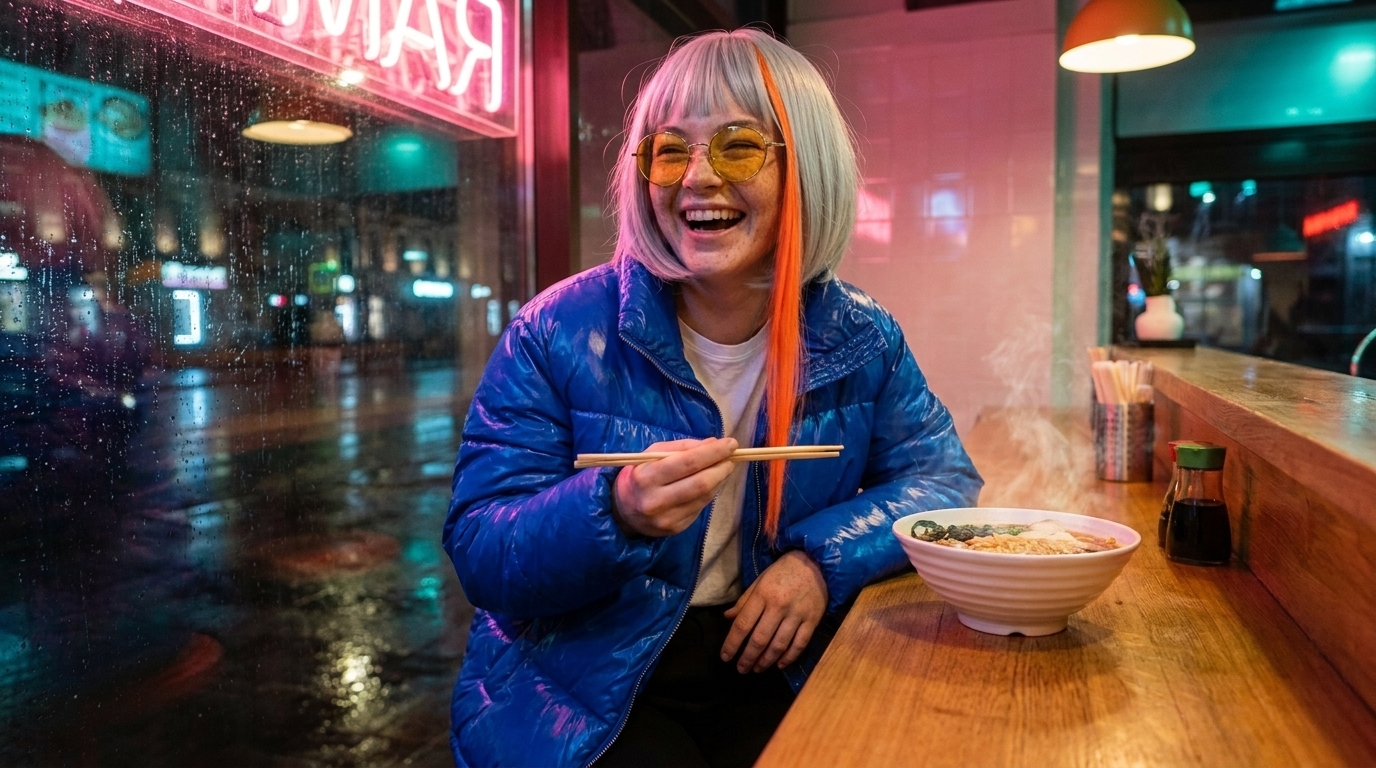
Same woman, same silver bob with the neon-orange streak, round yellow-tinted glasses, freckles and oversized cobalt-blue puffer jacket. She is now sitting on the counter of a neon-lit late-night ramen shop, holding chopsticks and laughing, steam rising from a bowl beside her. Warm pink and teal neon glow, rain-streaked window behind her, candid photorealistic street-photo style.
Here's how each feature held up against the master:
| Signature feature | Master (m1) | New scene (m2) |
|---|---|---|
| Silver bob + neon-orange streak | Yes | Yes |
| Round yellow-tinted glasses | Yes | Yes |
| Cobalt-blue puffer jacket | Yes, glossy | Yes, but looks a bit plastic |
| Freckles | Faint | Visible |
The identity carries over, and the freckles show more clearly this time. It isn't perfect, though. She sits at the counter instead of on it, and the hand resting on the counter looks rough and oddly veined up close. Hands are the first thing to check before you post.
If a feature drifts:
- Repeat that feature's exact wording from the master prompt.
- Regenerate. Every generation shows its price before it runs, so you know what each retry costs.
- When a scene comes out with all features right, keep it as a second reference image.
Same person as in the first image, with the same [SIGNATURE FEATURES, worded exactly as in the master prompt]. She is now [NEW SETTING], [ACTION]. [LIGHTING AND MOOD], candid photorealistic style, hands relaxed and clearly visible.
Step 3: Make your own trend-style movement clip
Motion control needs a video of someone doing the movement. It's tempting to download a viral video and use that, but you don't own it and the person in it didn't agree to be reused, and many platforms treat re-uploads as a violation. We generated our own source dancer with Kling 3.0 instead: a 5-second, 720p clip (std mode) with no sound, for 73 credits.
One dancer in a plain grey t-shirt and black joggers performs an upbeat trend-style dance in an empty white studio: two bouncy side steps, a shoulder shimmy, arms crossing over the chest then snapping out wide, a quick hip sway and a playful point toward the camera to finish. Full body always in frame from head to feet, static locked-off camera, plain white background, even lighting, smooth clear movement.
It works well as a motion source. The camera is static, the full body stays in frame and the background is plain. The side steps, the arm crosses, the arms snapping out wide and the final point toward the camera are all there, plus a quick spin we didn't ask for. Up close, the dancer's face warps and the hands smear during fast moves. That matters less here because only the movement gets transferred, not the dancer's face.
A good motion source has:
- One person only
- The full body in frame from head to feet for the whole clip
- A static, locked-off camera
- A plain background and even lighting
- Clear, readable moves. The fewer fast spins, the better (see Step 4).
You can also film yourself or a friend who agrees to it, or use footage you've licensed.
One continuous long take without any cuts. One dancer in [PLAIN OUTFIT] performs an upbeat trend-style dance in an empty white studio: [3-5 CLEAR MOVES IN ORDER]. Full body always in frame from head to feet, static locked-off camera, plain white background, even lighting, smooth clear movement.
Step 4: Put the AI character into the dance with Kling 3.0 Motion Control
Motion control takes your character image (m1) and makes it perform the movement from the source clip (m3). We used 720p mode, character_orientation set to video, and background_source set to input_video. It cost 104 credits.
Keep the silver bob with the neon-orange streak, round yellow-tinted glasses, freckles and the oversized cobalt-blue puffer jacket clearly visible throughout. Jacket keeps its glossy texture as she moves, glasses stay on, plain light-grey studio background, soft even lighting.
What held up: the silver bob with its orange streak, the yellow glasses (they stay on), and the glossy cobalt jacket all last from the first frame to the last, and the background and lighting stay steady. What didn't: during the fast spin, the face, glasses and hair blur heavily and the hands turn into blobs. Afterwards the face recovers, but it stays a bit smudged. The freckles show at the start and then disappear. Motion control shows a signature outfit much better than fine facial detail, which is one more reason to give your character bold, simple features.
The prompt adds details. It doesn't describe the dance. The movement comes from the clip.
- Use the prompt to protect the features: keep the glasses on, keep the jacket cobalt and glossy.
- Match the framing: a full-body character photo with a full-body dance clip.
- Choose source moves with fewer fast spins if you want the face to stay sharp.
- Setting character_orientation to video allows up to 30 s of driving video. Setting it to image allows 10 s.
Keep the [SIGNATURE FEATURES] clearly visible throughout. [HERO GARMENT] keeps its texture as she moves, [ACCESSORY] stays on, [BACKGROUND], soft even lighting.
What does one character plus one trend video cost?
| Step | Model | Credits |
|---|---|---|
| Master character image | Nano Banana Pro (1K) | 19 |
| Consistency scene | Nano Banana Pro (1K) | 19 |
| Own dance source clip | Kling 3.0 (5 s, 720p) | 73 |
| Character dance video | Kling 3.0 Motion Control (5 s) | 104 |
| Total | 215 |
On the Growth plan ($49 a month for 4,500 credits, about $0.011 per credit), 215 credits comes to roughly $2.40. Every generation shows its exact price before it runs. There's no free plan: generating needs a paid plan, and plans start at $19 a month. See plans and pricing.
To spend less on drafts, test your source clip ideas with Seedance 2.0 Mini (20 credits for a 5 s clip at 480p), and try scenes with Nano Banana 2 (9 credits for one 1K image) before running the final version. All prices are on the models page.
How to run this every week without starting over
- Save the four steps as a Workflow on the node canvas. Each week you only swap the scene prompt or the movement clip.
- Browse Trends for ready-made trend templates. Read more in AI dance videos.
- Add a soundtrack with Suno or a voice with ElevenLabs.
- Keep a library of reference images and movement clips you own, so every new post starts from approved material.
How do you run an AI character account responsibly?
- Use source clips you made or licensed. Don't re-upload other creators' viral videos.
- Label AI-generated content where the platform requires it, and say in the bio that the account is an AI character.
- Never fake locations, real-life events, endorsements or engagement.
- Don't make the character look like a real person.
- Don't promise income. Growth depends on the content, posting consistently, and the platform.
Questions
How do I keep an AI character consistent across images?
Make one full-body master image, then use it as the reference for every new scene, repeating the signature features in the same words each time. If a feature drifts, regenerate and keep good results as extra references.
Can I put my AI character into a trending dance video?
Yes. Kling 3.0 Motion Control animates a character image using the movement from a reference video. Use a source clip you made or licensed, not someone else's viral video.
How much does it cost to make an AI influencer video?
In our example, the master image, a consistency scene, a source dance clip and the motion control video came to 215 credits, about $2.40 on the Growth plan. Every generation shows its exact price before it runs.
Why do faces blur in AI dance videos?
Fast moves like spins make the face, hands and fine details smear, as you can see in our example. Bold features like hair color and a hero garment survive motion better, and source clips with fewer spins help.