URL to Video Ad Generator: Test Kubflow Auto Ads
Kubflow includes a URL to video ad generator that reads a product page and writes, casts and cuts multiple drafts automatically. A marketer pastes a link into the Auto ads workflow, and the tool extracts the images and copy to generate a batch of ready-to-test clips.
Testing different creative angles requires significant time and budget when relying on traditional production. To see how the platform builds these batches, you can turn a product page into a video ad using the Auto ads tool. It processes the destination URL directly to create several variations from the existing marketing assets. The system reduces the initial blank page problem by providing structural drafts.
The automated process outputs finished files, but a human must review the generated claims, visuals, and brand consistency before any media budget is spent. We will look at a real example of the full website-to-ads flow, then manually build one specific product scene to see how much control you have over the final output.
Can a URL to video ad generator make five ads from one website?
Marketers often need to know if a single product page can become a useful batch of ad drafts. An automated tool attempts to map the core product information into multiple distinct marketing hooks. The following example is a real ad made in Kubflow on 2026-10-01 for a made-up ice cream brand called CHOC CREAM. It demonstrates the platform going from the store's website to multiple finished ads.
This media piece is an existing ad created in Kubflow before this post. The frames display a 2D motion graphic sequence on a flat white background. Frame 1 shows typing text that reads "Want t". Frame 2 centers the phrase "Want to run more ads?" surrounded by portrait video thumbnails of people holding green ice cream containers. Frame 3 cuts to an orange logo and "Auto Ads". The white background and black-and-orange sans-serif typography remain consistent throughout the motion. The graphics use flat lighting, while the video thumbnails have varied natural and artificial light.
In our review of this run, the visible text is spelled correctly. The prompt's brand "CHOC CREAM" is also spelled correctly on the green containers. However, the system partially missed the input prompt. The date "2026-10-01", the store website link, the five distinct hooks, and exactly five finished ads are absent from these specific frames. Only three main thumbnails appear in the sequence.
The output also contains visible flaws. The hands holding the ice cream in the right-side thumbnails are warped. There is an inconsistent, tiny corrupted thumbnail floating in the bottom-left of frame 2. This example demonstrates the general website-to-ads flow, but it is not a claim that every product page will produce a flawless final result without editing.
What did the Kubflow Auto ads workflow do?
The sequence begins when you provide a store website. Auto ads reads the store URL to extract images, product names, prices, and features. It generates five distinct hooks based on that copy. The system then casts AI creators and mixes the assets to return finished ads.
Kubflow provides 92 ready-made AI creators through its UGC Avatars tool. The Auto ads workflow selects from these digital actors to deliver the generated scripts. The platform handles the text-to-speech generation, aligns the avatar's lip movements, and layers the video over the extracted product images.
When you receive a batch of drafts, you must inspect specific elements. Check the product accuracy first. The model might select an irrelevant background image from the website footer instead of the main product photo. Verify the offer matches the destination page exactly. An AI model might invent a discount or misinterpret a bulk pricing tier.
- Product accuracy: Does the featured image actually show the item being sold?
- Offer details: Are the prices, discounts, and shipping terms factual?
- Hook strength: Does the opening sentence capture the target audience?
- Creator delivery: Does the digital avatar pronounce the brand name correctly?
- Visual continuity: Do the transitions between shots make logical sense?
The website content is strictly the source for the draft. A human must always review the product facts, claims, rights, and brand requirements before publishing. You are responsible for ensuring the final asset complies with advertising regulations and platform policies.
How do you make one product scene for a URL-to-video ad?
Sometimes the automated extraction pulls a low-resolution image, or the brand requires a specific aesthetic that the website photos do not provide. In these cases, you can generate a custom b-roll scene manually to replace a shot in the Auto ads draft. We used a wireless sleep-earbuds product as a separate worked example to show how one scene can be built and checked.
We generated the product still with Nano Banana Pro from a text prompt only. Nano Banana Pro is Google's premium image model, available on the Nano Banana page. It costs 19 credits for one 1K image. We recorded this exact price displayed in the interface before generation.
Create a single product-ad still for a [PRODUCT CATEGORY]. Show a [SPECIFIC ITEM DESCRIPTION] on a [SURFACE MATERIAL], with a [BACKGROUND OBJECT 1] and a [BACKGROUND OBJECT 2] softly out of focus in the background. Keep the product centered and fully visible, with clean negative space around it, natural warm morning window light, realistic materials, and no people, text, logos, or extra products.
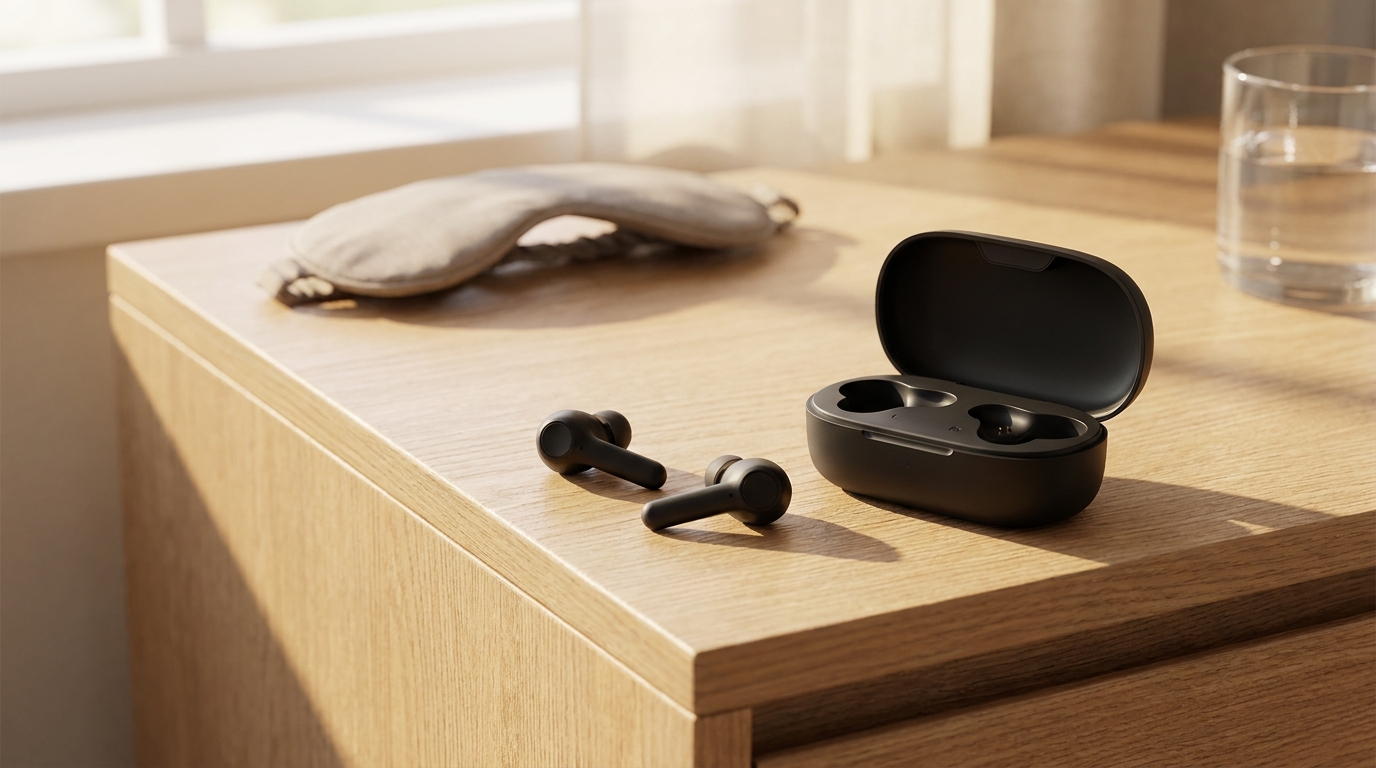
Create a single product-ad still for a wireless sleep-earbuds brand. Show a small matte-black charging case open with two matching earbuds beside it on a light oak bedside table, with a folded eye mask and a glass of water softly out of focus in the background. Keep the product centered and fully visible, with clean negative space around it, natural warm morning window light, realistic materials, and no people, text, logos, or extra products.
In our run, the image shows a matte-black charging case open on a light oak bedside table, with two matching black earbuds placed in front. The case and earbuds are fully visible. The product sits slightly right of center rather than exactly centered. A folded light-colored eye mask appears in the background, and a glass of water is visible at the upper right. Both background objects are softly out of focus.
Warm morning light enters from the window at the left, producing long shadows and bright highlights on the wood, glass, and case. The materials appear realistic, showing matte plastic, reflective glass, and visible oak grain. There are no people, readable text, logos, or extra products. The requested clean negative space is partly reduced by the large tabletop and background objects. The case contains dark, uneven interior shapes and a small indistinct mark on its front, but no legible text.
We then used this still as the starting frame for a video clip. To animate the scene, we sent the image to Seedance 2.0 Fast, which is a lower-cost model available on the Seedance 2 page. We applied a strict motion prompt and left generate_audio off. The exact price displayed before generation was 61 credits for a 5-second clip at 480p.
Begin with the product completely still. Make a slow push-in while the camera arcs slightly from left to right. Let soft morning light move across the surface as a few condensation droplets slide downward. Keep the product shape, color, label, background, framing, and composition unchanged. No people, text changes, added objects, or cuts.
Begin with the product completely still. Make a slow push-in while the camera arcs slightly from left to right. Let soft morning light move across the surface as a few condensation droplets slide downward. Keep the product shape, color, label, background, framing, and composition unchanged. No people, text changes, added objects, or cuts.
In our run, the video features the black wireless earbuds and open charging case on the wooden table, with the sleep mask and water glass in the background. The lighting is a warm, directional morning light casting static shadows. Across the frames, the video maintains strict consistency in object shape, color, background, and lighting. No text is present.
The generation followed instructions for a slow push-in, a still product, morning light, and an unaltered composition with no people, cuts, or added objects. However, the model missed several directions. It failed to include the requested camera arc and completely missed the sliding condensation droplets. The motion is simply a slow, straight camera push-in.
There are also visible flaws in the clip. The left earbud stem attaches to the earpiece at a warped, unnatural angle. In the background, the bubbles inside the water glass remain completely frozen despite the camera movement. This manual process allows precise control over the camera and lighting, but the resulting anomalies show where human oversight remains necessary.
What does a website-to-video ad still need from a human?
An automated draft is only the first step. You must check that the generated product matches the real item. The colors, packaging, and specific model variations in the video must align with the inventory on the destination page. If the ad shows a matte black case but the store only sells gloss white, the discrepancy will hurt conversion rates.
Next, review the hooks and scripts for unsupported claims. The AI might write a script offering a lifetime warranty because it learned that phrase from other ecommerce copy, even if your site only offers 30 days. You must also verify disclosure requirements, ensure the tone fits your audience, and check the digital creator's pronunciation of industry terms.
The final stage requires a media buyer to choose the strongest ads and discard the rest. You might need to revise weak openings or confirm the final call to action points to the correct funnel step. Check that the finished video meets the ad platform's current specifications for aspect ratio, safe zones, and file size.
For strict compliance and brand standards, another editing or production tool is often needed. You might take the exported Kubflow draft into a traditional nonlinear editor for brand-approved finishing, detailed retouching of warped elements, or campaign-specific text overlays. To understand more about turning specific still assets into video layers, you can read our guide on how to turn a product photo into a video ad with AI.
Is Kubflow useful for turning a product page into video ads?
Auto ads is a useful starting point when the goal is to turn existing product information into multiple ad directions quickly. It maps a URL to a set of scripts and visuals in minutes. The strongest workflow combines Auto ads for rapid variations with deliberate product stills and image-to-video scenes for the shots that need tighter control.
Every generation shows its exact price before it runs, keeping costs predictable. A new account gets free tries: 5 images, 1 video and 1 Trend video (the Trend carries a "Made with Kubflow" watermark). After that, generation requires a paid plan starting at $19 a month. The Growth plan is $49 a month for 4,500 credits, making the credit cost roughly $0.011.
The platform does not replace the marketer's judgment or the need for careful visual review. It provides the initial raw material. If you want to test the workflow on your own store link, you can use the URL to video ad generator to see what hooks the system extracts from your copy.
Questions
Can an AI video ad generator make an ad directly from a URL?
Yes, the Kubflow Auto ads tool reads a product page URL, extracts images and text, writes hooks, and generates finished video drafts automatically.
Do I need to edit the video after the AI generates it?
Yes. A human must review the generated video for accurate product claims, correct pricing, visual flaws, and brand compliance before spending any media budget.
How much does it cost to generate an image or video in Kubflow?
Every generation shows its exact price before it runs. For example, Nano Banana Pro costs 19 credits for a 1K image, and Seedance 2.0 Fast costs 61 credits for a 5-second 480p clip.
Are there free tries available for new accounts?
Yes, a new account gets free tries for 5 images, 1 video, and 1 Trend video. After that, a paid plan is required to generate media.