AI Video Generator for Claude: Kubflow MCP Setup and Costs

Yes, you can make videos from Claude. Claude can't render video by itself, but an MCP connector lets it call outside video and image models and bring the results back into your chat. Kubflow's hosted MCP server connects Claude to Veo 3.1, Kling 3.0, Seedance 2.5, Wan 3.0, Nano Banana Pro, GPT Image 2.5 and every other model in one Kubflow subscription. You add one URL in Claude's connector settings; the Kubflow MCP setup page for Claude, ChatGPT and Cursor has the details for every app, and the steps are below.
Below are the exact connector steps, then a real test run from inside Claude: one product still for 19 credits, then that still turned into a 5-second Kling 3.0 clip for 73 credits. You'll see what each output got right, where it fell short, and what a month of this kind of work costs.
Can Claude generate videos? Yes, through an MCP connector
MCP (Model Context Protocol) lets Claude use tools that run somewhere else. With Kubflow connected, Claude can list the models, check what a generation will cost, send the job to the model you pick and show you the result in the same conversation.
The server lives at https://kubflow.ai/api/mcp. Anything you generate through it spends the connected Kubflow account's credits at the same prices as the Kubflow app, so a Kling 3.0 clip costs the same whether you start it in Claude or in the video generator.
How to connect Kubflow to Claude, step by step
This works in Claude on web, desktop and mobile. You need a Kubflow account to sign in to during setup.
- In Claude, open Settings, then Connectors.
- Click Add custom connector.
- Name it Kubflow and paste https://kubflow.ai/api/mcp as the URL.
- Click Connect, sign in to Kubflow and allow access.
- Start a new chat and ask: "List the Kubflow models and their prices." If you get the model list back, the connector is working.
There's also an optional local connector, run with uv, that uploads files from your computer. Use it if you want your own product photos as start frames instead of generated stills. The hosted connector alone covers everything in the test below, since we started from a text prompt.
What you can ask Claude to do once it's connected
Through the connector, Claude can list models, check the exact price of a generation, generate images, videos and audio, and plan and make full video ads with Auto ads. Requests that fit how a media buyer actually works:
- "What would a 5-second Kling 3.0 clip at 720p cost, and what would Seedance 2.0 Mini cost for the same length?"
- "Make a 16:9 product still of [your product] on a kitchen counter with empty space on the right for copy."
- "Animate that still with a slow push-in, no sound, 5 seconds."
- "Write a 15-second voiceover script for [your product] and generate it with ElevenLabs."
- "Make a short upbeat Suno track to go under the clip."
- "Plan a video ad for [your website URL] with Auto ads."
Auto ads builds a finished video ad from a website, a product photo or one sentence. We didn't run it in this test, so if you want to see what it produces first, the Auto ads overview with examples is the better place to look.
Test 1: a product still with Nano Banana Pro (19 credits)
Our first test through the connector was an ad still for a matte orange earbuds case, made from a prompt only, no start image. Settings: Nano Banana Pro, 16:9, 1K. The cost was 19 credits, about $0.21 at Growth-plan rates. The full prompt is shown under the image.
To repeat this, ask Claude: "Use Kubflow to make this image with Nano Banana Pro at 16:9 and 1K, and tell me the price before you run it," then paste the prompt below.
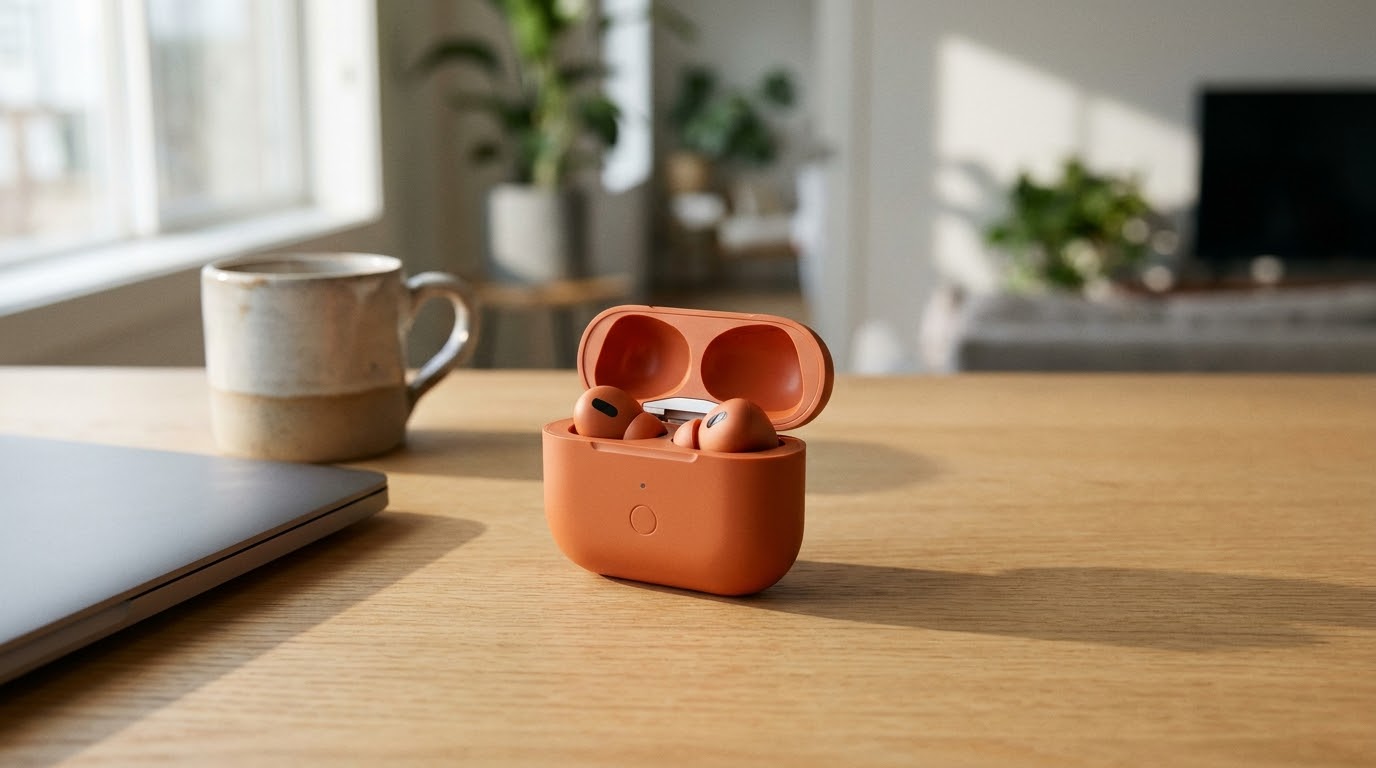
Commercial product photo of a matte orange wireless earbuds charging case, lid open, both earbuds seated inside, placed on a light oak desk beside a closed silver laptop and a ceramic coffee mug. Soft morning window light from the left, gentle shadows, shallow depth of field with the background softly blurred. Clean, modern ad style, true-to-life colors, crisp detail on the case hinge and the small embossed logo dot. Plenty of empty space on the right side for ad copy.
What came out of this single run:
- Got right: the orange case with its lid open and both earbuds inside, the oak desk, the silver laptop and the mug, light coming from the left, a blurred background and open space on the right for copy.
- Partly right: the hinge is clearly visible, but the embossed logo dot we asked for isn't clearly identifiable. There's a small dot and a larger circular mark on the front instead.
- Needs attention: the earbuds have uneven, slightly bulbous shapes. The laptop is cropped at the lower left, and the soft shadows extend a long way across the desk.
Treat it as a strong draft, not a final asset. For a real campaign we'd fix the earbud shapes before adding copy. Another Nano Banana Pro generation at the same 1K settings costs 19 credits; check the displayed price before running an edit or changing settings.
Why Pro: Nano Banana Pro is Google's premium image model, with sharper 2K imagery and better text rendering. This shot had no text in it, so the text rendering wasn't tested here. If you just need drafts to choose a direction, Nano Banana 2.1 costs 5 credits for a 1K image, about a quarter of Pro.
Commercial product photo of [your product, with color and finish], placed on [surface] beside [one or two props]. Soft window light from the left, gentle shadows, shallow depth of field with the background softly blurred. Clean, modern ad style, true-to-life colors, crisp detail on the product edges. The right third of the frame is empty, plain background, kept clear for ad copy.
Test 2: turning the still into a Kling 3.0 clip (73 credits)
Next we asked Claude to animate that exact still with Kling 3.0. The input was the Nano Banana Pro still above as the start frame, and the prompt described motion only. Settings: 5 seconds, std mode (720p), sound off, 16:9. The cost was 73 credits, about $0.80 at Growth-plan rates.
Then ask: "Animate that image with Kling 3.0, 5 seconds, std mode, no sound, 16:9, using this prompt, and show me the price first."
Slow, smooth camera push-in toward the earbuds case. The right earbud lifts gently out of the case and rotates a quarter turn in the air, catching the window light, then settles back into place. Light dust motes drift through the sunbeam. The background stays softly blurred and the camera ends steady on the case.
What our reviewer saw in this run:
- Got right in the reviewed frames: the case appears larger by frame 3, consistent with a camera push-in. The right earbud is seated in frame 1, raised and turned in frame 2, and seated again in frame 3. The background remains softly blurred, while the case and left earbud look consistent across those frames.
- Not confirmed: whether the lift and quarter-turn read as smooth motion. Our review was done from still frames, which can't show that.
- Missed: the dust motes in the sunbeam aren't visibly distinguishable. The raised earbud's stem and the white interior hinge area look somewhat distorted.
This run demonstrates image-to-video generation through the connector, but the lifted earbud is visibly distorted. A simpler follow-up experiment would be a camera push-in with both earbuds remaining seated. We haven't tested that alternative, so we can't say whether it would reduce distortion or retries.
Kling 3.0 runs 3 to 15 seconds and offers 720p (std), 1080p (pro) and 4K. The listed 73-credit price applies to a 5-second clip at 720p. Ask Claude to check the exact price for your chosen duration and resolution before generating. For testing hooks on a budget, Seedance 2.0 Mini costs 20 credits for 5 seconds at 480p and Grok Video 1.5 costs 15 credits for 6 seconds at 480p. The image-to-video guide comparing Kling, Seedance, Veo and Wan covers the other options.
One continuous long take without any cuts. Slow, steady camera push-in toward [your product]. [One small motion, such as steam rising from the cup or the lid closing slowly]. The product shape and any label stay exactly as in the start frame. Warm light from the left, background softly blurred, camera ends steady on the product.
What a Claude video workflow costs per month
There's no free plan. A new account gets free tries: 5 images, 1 video and 1 Trend video, and the Trend carries a "Made with Kubflow" watermark. After that, you need a paid plan to generate.
Plans start at $19 a month. Growth is $49 a month for 4,500 credits, about $0.011 per credit. Top-ups add one-time credits on top of a plan, and bigger plans pay less per credit. Dollar amounts below use the Growth rate. Other plans work out differently.
| Model | What you get | Credits | About, at Growth rate |
|---|---|---|---|
| Nano Banana 2.1 | One 1K image | 5 | $0.06 |
| Nano Banana Pro | One 1K image | 19 | $0.21 |
| Grok Video 1.5 | 6 s clip at 480p | 15 | $0.17 |
| Seedance 2.0 Mini | 5 s clip at 480p | 20 | $0.22 |
| Google Veo 3.1 | 8 s clip | 32 | $0.35 |
| Kling 3.0 | 5 s clip at 720p | 73 | $0.80 |
One Pro still plus one Kling 3.0 clip used 92 credits. Growth's 4,500 monthly credits cover 48 complete pairs at those settings, with 84 credits left, before retries or other generations. That is a generation budget, not a forecast of 48 ad-ready assets: both outputs in this test had visible defects. Full plan details are on the pricing page with plans and what a credit buys.
Does it work in ChatGPT, Cursor and Claude Code too?
Yes. In ChatGPT, add the same URL as a custom connector in ChatGPT's Connectors settings. Cursor has a one-click install. Claude Code, Codex and other MCP apps add the same URL, https://kubflow.ai/api/mcp.
Generations spend the connected Kubflow account's credits at the same prices as the app. Connecting that account from another supported app does not change generation prices.
Kubflow vs Higgsfield for MCP video (honest comparison)
Higgsfield also offers MCP video in Claude. The facts below were checked on higgsfield.ai on 2026-10-27 and may have changed since. This isn't a full feature or price comparison.
| Kubflow | Higgsfield (checked 2026-10-27) | |
|---|---|---|
| MCP in Claude | Yes, hosted connector | Yes |
| ChatGPT | Custom connector | ChatGPT plugin |
| Entry plan | From $19/month | Starter $15 |
| Mid plan | Growth $49/month, 4,500 credits | Plus $49 ($39 yearly) |
| Higher tiers | Bigger plans pay less per credit | Ultra $129 ($99 yearly), Teams from $65 a seat |
| Seedance 2.5 cost per second | Higher than Higgsfield's yearly plans | Lower on yearly plans |
Higgsfield also has an API, and some of its plans include "unlimited" generations on some models. Those run on a shared pool and can take longer. If most of your volume is Seedance 2.5 and you're happy to pay yearly, Higgsfield costs less per second of video. That's a real advantage, so check it against your own volume.
Kubflow offers every model listed here through one subscription and credit balance, and shows the exact price before each generation. The connector can also plan and make finished video ads with Auto ads. For the dated competitor details, see the full Higgsfield vs Kubflow comparison.
Questions
Can Claude make videos on its own?
No. Claude doesn't render video itself. With an MCP connector like Kubflow's, Claude sends the job to video models such as Kling 3.0 or Veo 3.1 and shows the result in the chat.
What is the Kubflow MCP server URL?
https://kubflow.ai/api/mcp. In Claude, go to Settings, Connectors, Add custom connector, paste the URL, then connect and sign in to Kubflow.
Does using Kubflow through Claude cost more than the app?
No. Generations through the connector spend your Kubflow credits at the same prices as the app. For example, a Kling 3.0 clip of 5 seconds at 720p is 73 credits either way.
Is there a free way to try it?
There's no free plan, but a new account gets 5 images, 1 video and 1 Trend video free, and the Trend is watermarked. After that, plans start at $19 a month.
Can I use my own product photos as start frames?
Yes. The optional local connector, run with uv, uploads files from your computer so you can animate your own photos instead of generated stills.