How to Make a Viral AI Character: Reference Sheet to Video Swap
To make a viral AI character, design a believable person around 2-4 exaggerated traits and describe each trait in exact words. Then build one master full-body image and turn it into a character reference sheet. Next, shoot or generate your own dance clip, place the character into that clip's first frame, and swap them into the motion with Kling 3.0 Motion Control. Below we run the whole pipeline on one original character and show every real output, flaws included, along with the exact prompts and the credit cost of the full run.
What makes an AI character go viral (and why it isn't an AI influencer)
The goofy character accounts pulling millions of views on TikTok and Reels are not polished, pretty AI influencers. That's a different format. They feature a real-looking person who could plausibly exist, built around a few traits pushed just past normal. The comedy comes from that person doing ordinary viral things with total seriousness.
Recognition matters more than beauty. Viewers scroll past at thumbnail size, so the silhouette and the color palette need to read in a fraction of a second. If someone can spot your character from a 100-pixel preview, you have a recurring character. If they can't, you just have a random AI person.
For this test we designed an original character: a tall, skinny man with a copper-ginger helmet bowl cut, round thick black glasses and a pencil moustache. He wears a mustard 1970s corduroy three-piece suit, white tube socks and penny loafers. Each element is a shape or a color you can see from across the room.
How do you write traits that survive thumbnails and motion?
Vague words let the model pick a different interpretation every time, and that's exactly how a character drifts between images and falls apart in video. Specific wording pins the trait down.
| Vague | Specific (what we used) |
|---|---|
| funny haircut | a perfectly round, glossy copper-ginger helmet bowl cut that ends exactly at his eyebrows and the tops of his ears |
| nerdy glasses | thick black coke-bottle glasses that visibly magnify his eyes |
| a moustache | a thin dark-ginger pencil moustache clearly visible above his upper lip |
| retro suit | a too-short mustard-yellow 1970s corduroy three-piece suit with huge wide lapels |
| tall and thin | a very tall, ridiculously skinny man in his 30s |
- Give every trait a shape, a color and a hard edge ("ends exactly at his eyebrows" beats "short").
- Stop at 2-4 headline traits. Ours are the bowl cut, the glasses, the moustache and the mustard suit. Everything else supports them.
- Write the trait paragraph once and paste the exact same wording into every prompt, from the master image to the swap.
Write the character description once, word for word, and reuse it in every prompt. Each time you rephrase it, you give the model room to drift.
Step 1: Generate the master full-body image
The master image is the source of truth for every later step. We made it with Nano Banana Pro from a prompt only, at 16:9 and 1K, for 19 credits.
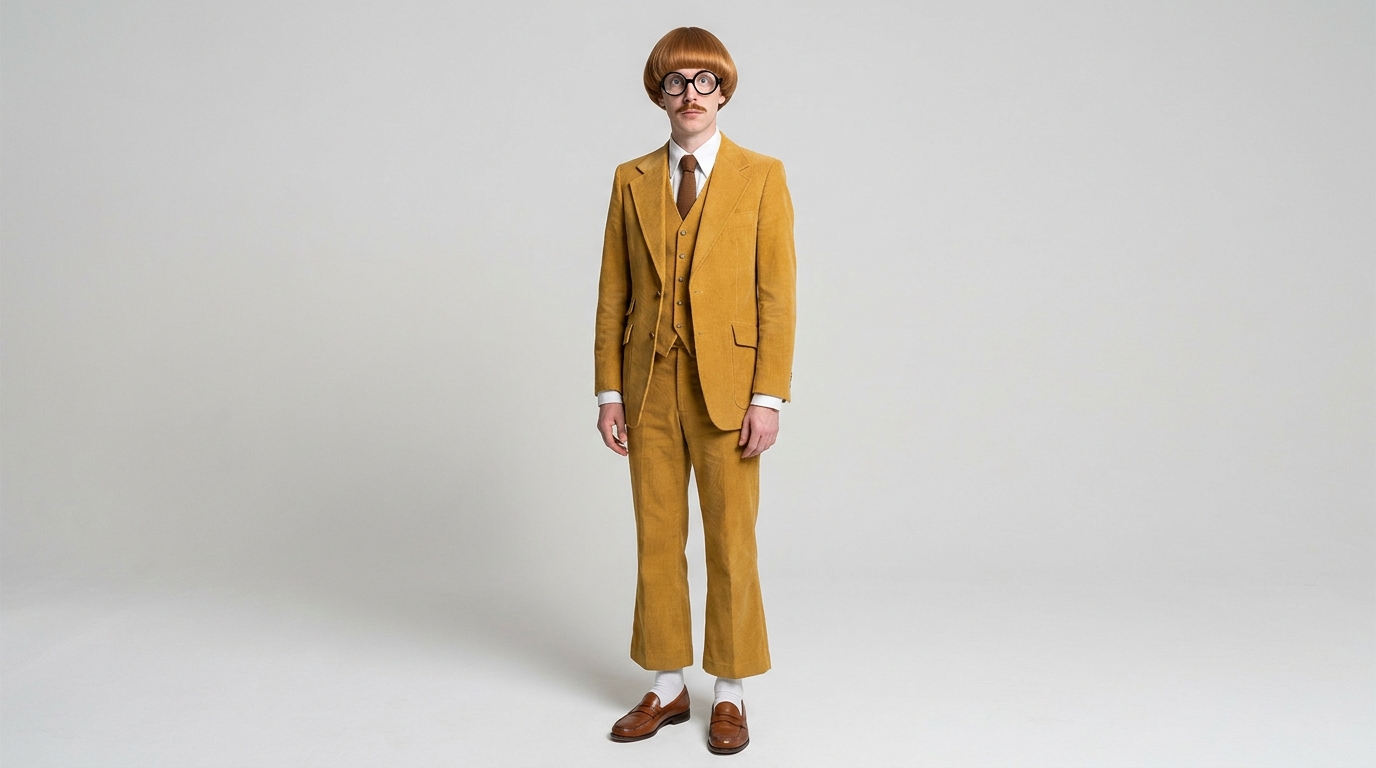
Full-body studio photograph of a very tall, ridiculously skinny man in his 30s with a perfectly round, glossy copper-ginger helmet bowl cut that ends exactly at his eyebrows and the tops of his ears, thick black coke-bottle glasses that visibly magnify his eyes, a thin dark-ginger pencil moustache clearly visible above his upper lip, wearing a too-short mustard-yellow 1970s corduroy three-piece suit with huge wide lapels over a crisp white shirt and a thin chocolate-brown tie, flared trousers that stop above the ankle showing white tube socks, and brown penny loafers. Front view, relaxed standing pose, arms slightly away from the body, head to toe in frame, plain seamless light-grey studio, soft even light. Photorealistic, a believable real person photographed on a 50mm lens, natural skin texture, not a cartoon.
Each framing choice has a reason:
- Full body, head to toe: socks and loafers are part of the silhouette, and motion control needs to see the legs.
- Front view with arms slightly away from the body: hands and suit edges stay readable rather than merging into the torso.
- Plain light-grey studio backdrop with soft, even light: no background or hard shadows for later steps to copy by accident.
- "Photorealistic, a believable real person, 50mm lens, not a cartoon": this keeps the character in the real-looking style these accounts rely on.
Check the result before moving on. Ours got the bowl cut, glasses, moustache, suit color, short flared trousers and socks right. One thing fell short: the lapels came out standard size instead of huge. We kept it because the headline traits all read clearly. If one of your 2-4 headline traits is missing, regenerate now, because every later step inherits this image's mistakes.
Full-body studio photograph of [AGE AND BUILD, e.g. a very short, stocky woman in her 50s] with [HAIR: shape, color and exact edge], [FACE TRAIT: glasses, moustache or other feature, with size and color], wearing [OUTFIT: era, color, fabric and fit, down to socks and shoes]. Front view, relaxed standing pose, arms slightly away from the body, head to toe in frame, plain light-grey studio backdrop, soft even light. Photorealistic, a believable real person photographed on a 50mm lens, natural skin texture, not a cartoon.
Step 2: Build the character reference sheet
A character reference sheet (also called a turnaround sheet) shows the same person from every side. We gave Nano Banana Pro the master image as the reference, pasted in the same trait paragraph and asked for two rows: five full-body angles on top and three close-up headshots below. Cost: 19 credits.
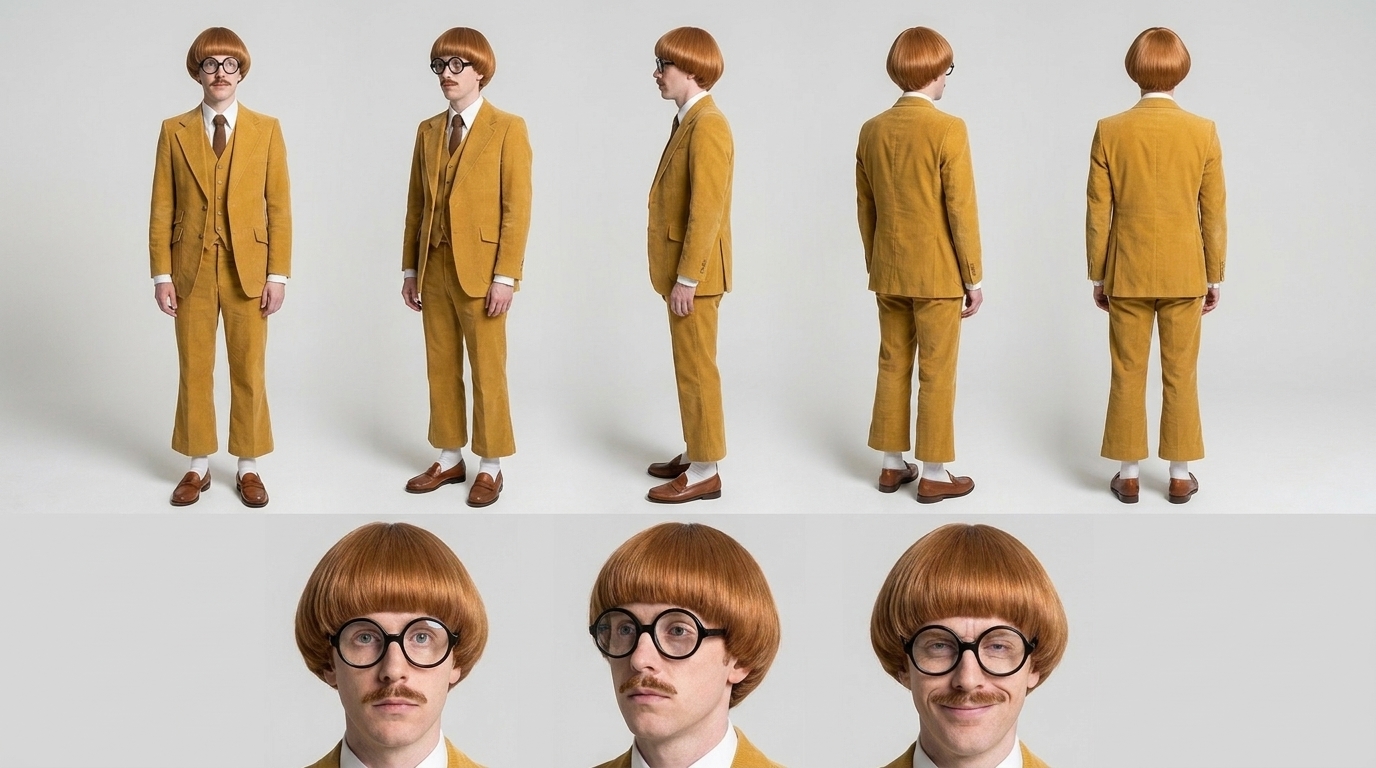
Character reference sheet of the exact man in the first image: a very tall, ridiculously skinny man in his 30s with a perfectly round, glossy copper-ginger helmet bowl cut that ends exactly at his eyebrows and the tops of his ears, thick black coke-bottle glasses that visibly magnify his eyes, a thin dark-ginger pencil moustache clearly visible above his upper lip, wearing a too-short mustard-yellow 1970s corduroy three-piece suit with huge wide lapels over a crisp white shirt and a thin chocolate-brown tie, flared trousers that stop above the ankle showing white tube socks, and brown penny loafers. One wide image in two rows. Top row: five full-body views at the same scale, front, three-quarter front, side profile, three-quarter back, back, same relaxed standing pose. Bottom row: three close-up headshots, neutral front, three-quarter, and his signature expression, a smug tight-lipped smirk with one raised eyebrow. Same plain light-grey studio and soft lighting in every panel, the same face, moustache, glasses and outfit in every panel, photorealistic, no text, no labels.
The sheet matters because a single front view gives the model no information about the back of the head or the side profile. When the character turns mid-dance, the model has to invent those angles. The sheet settles them once, and it becomes your reference for future images, thumbnails and new scenes.
What to check: the back view (does the bowl cut stay a clean helmet shape?), the glasses and the moustache in every panel, and the same outfit everywhere. Our sheet kept the face, hair color, moustache and suit consistent across panels. It also drifted in ways worth knowing about. The build came out average rather than ridiculously skinny, the lapels stayed standard, and the third headshot is a plain smile instead of the smug raised-eyebrow smirk. The side-profile glasses are also missing the arm over the ear, and the hair volume differs slightly between the rows. For a recurring account, regenerate until the signature expression and body type come through.
Character reference sheet of the exact person in the first image: [PASTE YOUR FULL TRAIT PARAGRAPH, word for word]. One wide image in two rows. Top row: five full-body views at the same scale, front, three-quarter front, side profile, three-quarter back, back, same relaxed standing pose. Bottom row: three close-up headshots, neutral front, three-quarter, and their signature expression, [SIGNATURE EXPRESSION]. Same plain light-grey studio and soft lighting in every panel, the same face, hair, glasses and outfit in every panel, photorealistic, no text, no labels.
Step 3: Make your own source clip
The motion has to come from somewhere. Use only clips you filmed yourself, generated yourself or have a license for. Re-uploading another creator's dance with your character pasted over them is still their content. We generated our own source clip with Kling 3.0: 5 seconds, std mode, sound off, 16:9, for 73 credits.
Handheld-looking but steady phone footage, static framing: one ordinary young man in a plain grey hoodie and blue jeans does a goofy, over-the-top viral dance on red brick pavement in front of a glass office-building entrance. He flaps both arms like a chicken, bounces his knees in and out, does a stiff robotic shoulder pop, then struts proudly sideways with big exaggerated steps. Full body always in frame from head to shoes, camera does not move, bright daylight, realistic footage.
What makes a good motion source:
- A static camera, so the background stays put and only the person moves.
- Full body in frame from head to shoes the whole time.
- One person, plain clothes and big, readable moves (arm flaps, knee bounces, struts) rather than fast fingerwork.
- Even daylight with no hard flicker.
Our clip got the setting, clothing, static framing and most of the moves right. The robotic shoulder pop never appeared, and the hands blur during the fast arm flaps. There's also a white mark on the pavement between his feet, which every later step inherits. Expect flaws in the source clip to carry into the swap, so pick the cleanest take you have.
One continuous long take without any cuts. Handheld-looking but steady phone footage, static framing: one ordinary person in [PLAIN OUTFIT] does a goofy, over-the-top viral dance in front of [LOCATION]. They [3-4 BIG DANCE MOVES IN ORDER]. Full body always in frame from head to shoes, camera does not move, bright daylight, realistic footage.
Step 4: Put the character into the clip's first frame
Most guides skip this step. Before we made this image, we drove a plain-studio master image of the character straight into Motion Control with a source clip, twice: once with character_orientation set to video and once set to image, both with background_source set to input_video. Both times the output kept the master image's plain grey studio instead of the office entrance, so it never looked like a swap into the clip. That's what happened in our runs, not a documented rule, but it changed how we built the pipeline.
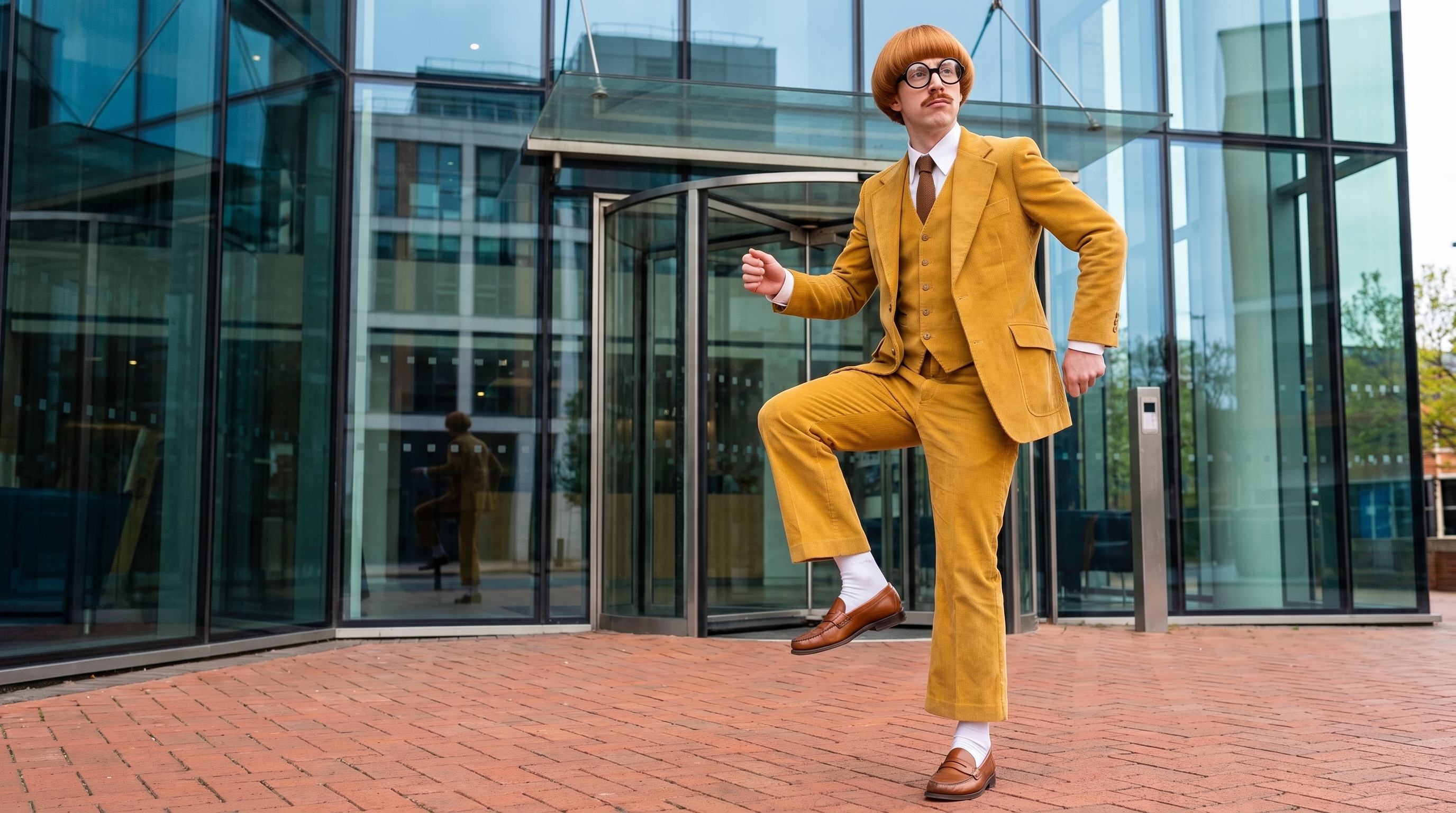
The fix was to place the character into the clip's first frame first. We gave Nano Banana Pro two references, the master image (the character) and the first frame of the source clip (the scene). The prompt asked it to replace the man in the hoodie while keeping the frame, the position and the pose exactly the same. Cost: 19 credits.
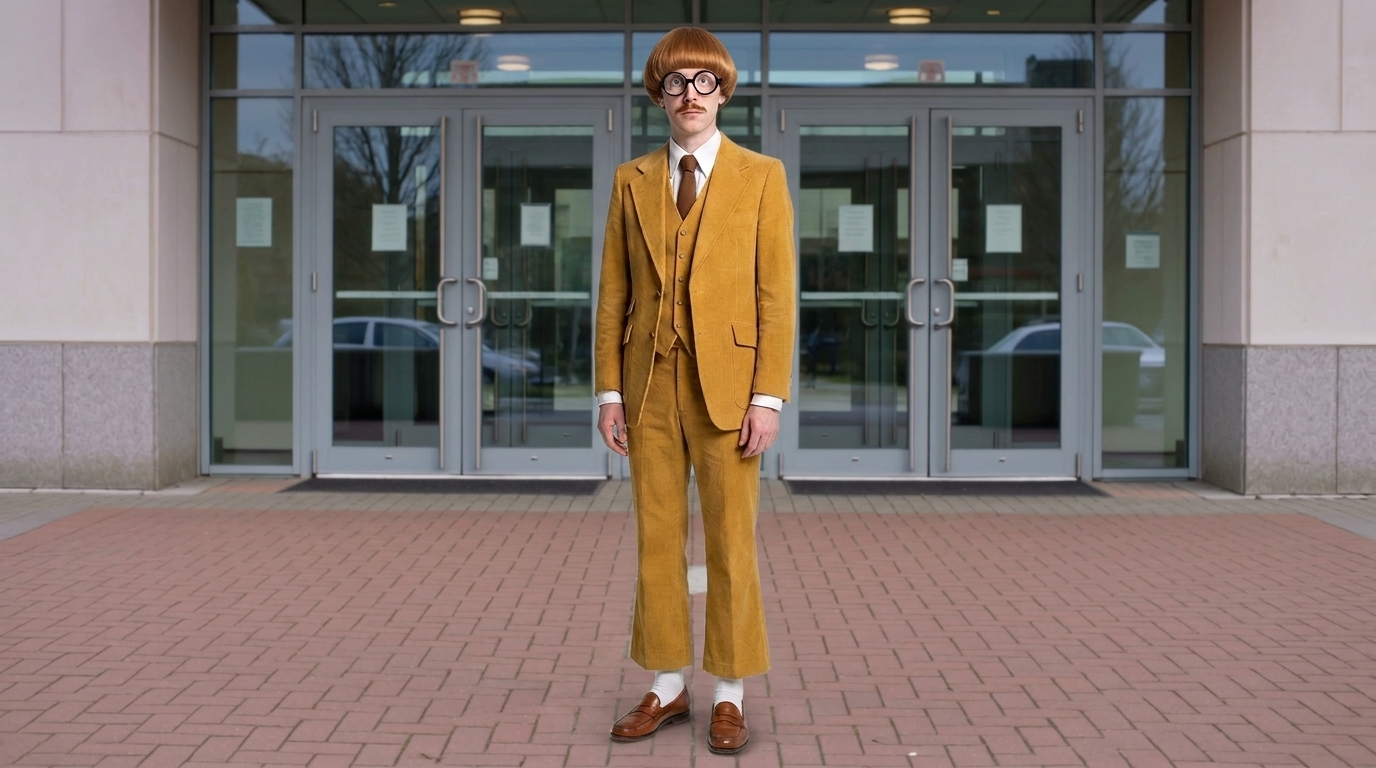
Replace the young man in the grey hoodie in the second image with the man from the first image. Keep the second image exactly as it is: the glass office-building entrance, the red brick pavement, the daylight, the camera position and framing, and his position, size and pose in the frame. The man from the first image keeps his copper-ginger helmet bowl cut, round thick black glasses, thin pencil moustache and mustard-yellow corduroy three-piece suit with white shirt, brown tie, white tube socks and brown penny loafers, lit by the same daylight so he belongs in the scene. Photorealistic, full body in frame.
The character came through with his bowl cut, glasses, moustache and full outfit, standing on the brick pavement in front of the glass entrance. The light, scale and position match the original frame closely. The weak spots are small: the lapels are still standard size, and the white mark on the pavement shows between his legs. Fix anything that will be visible in motion before you continue, because the swap carries it through.
Replace the person in [DESCRIBE THEM, e.g. the grey hoodie] in the second image with the person from the first image. Keep the second image exactly as it is: [SETTING DETAILS], the light, the camera position and framing, and their position, size and pose in the frame. The person from the first image keeps their [HEADLINE TRAITS AND OUTFIT], lit by the same light so they belong in the scene. Photorealistic, full body in frame.
Step 5: Swap the character into the clip with Kling 3.0 Motion Control
Kling 3.0 Motion Control makes the person in a character image perform the movement of the person in a reference video. We drove the composited first frame with the source clip using mode 720p, character_orientation video and background_source input_video, for 104 credits. The prompt only restates the traits. Motion comes from the video, so the prompt should add detail rather than describe movement.
Keep his copper-ginger helmet bowl cut, thick black glasses, thin pencil moustache and the mustard-yellow corduroy suit with white shirt, brown tie and white tube socks exactly as in the image.
What held: the office entrance, the brick pavement and the daylight stayed put, and the bowl cut, glasses, moustache, mustard suit, tie and socks stayed consistent through the squatting, side-stepping dance. What to watch: the hands smear during the fast arm flaps, the white pavement mark from the source clip stays between his feet, and in the last second, as he turns away, the face goes soft and the glasses sit slightly crooked. In practice, trim the clip before the turn or rerun it, and keep the source moves big and the takes short.
- character_orientation video allows up to 30 s of driving video; image allows 10 s.
- background_source picks whose background you keep. With the character already placed in the first frame, input_video kept the real scene in our run.
- Match framing between the character image and the video. Step 4 handles that for you.
What the full run cost
| Step | Model | Credits |
|---|---|---|
| Master image (m1) | Nano Banana Pro, 16:9, 1K | 19 |
| Reference sheet (m2) | Nano Banana Pro, 16:9, 1K | 19 |
| Source clip (m3) | Kling 3.0, 5 s, std, no sound | 73 |
| Character in first frame (m4) | Nano Banana Pro, 16:9, 1K | 19 |
| Swap (m5) | Kling 3.0 Motion, 720p | 104 |
| Total shown in this post | 234 |
At the Growth plan's rate ($49 for 4,500 credits, about $0.011 per credit), 234 credits comes to roughly $2.60. To be honest about the full picture, our two failed test swaps, the ones that kept the grey studio, cost another 2 × 104 = 208 credits, which brings the real total to 442 credits. Skipping Step 4 cost more than doing it. Every generation shows its exact price before it runs. See plans and pricing or all models with prices.
Fixing drift and running an AI character account responsibly
Fixes for drift
- Trait missing or softened (like our lapels or skinny build): make that trait more extreme and more physical in the wording, then regenerate the master image before anything else.
- Signature expression ignored: generate it as its own close-up from the master image, then use it as an extra reference.
- Background reverts to the studio during the swap: put the character into the clip's first frame first (Step 4) and drive that image.
- Face goes soft late in the clip: use shorter driving clips, trim before the breakdown or rerun. Keep the face reasonably large in frame.
- Hands warp: choose source moves where the hands stay open and slow, and accept that hands are still the weakest point.
- Marks on the ground or clothing: clean up the first-frame image (Step 4) before the swap, because the swap carries them through.
Run it responsibly
- Use only your own or licensed source clips. Don't lift other creators' dances.
- Label the content as AI-generated, in the caption and with the platform's AI label.
- Never fake a location, an event or engagement, and never use a real person's likeness without permission.
- Don't promise followers income or virality. Treat it as a creative format you test, not a guaranteed money-maker.
Want a shortcut for the motion step? Trends puts a person or character into ready-made viral dances, and Workflows lets you connect the master image, the sheet, the first-frame composite and the swap on one canvas.
Questions
How do I keep an AI character consistent across TikTok videos?
Write the traits once in exact, physical language and reuse that paragraph word for word. Build a reference sheet from one master image and use the master image or sheet as a reference in every new generation.
What is an AI character reference sheet?
It's one image showing the same character from several angles, typically front, three-quarter, side, three-quarter back and back, plus close-up headshots. It fixes details like the back of the head and the side profile so later images and videos don't have to invent them.
How do I swap an AI character into a dance video?
Use a motion-control model such as Kling 3.0 Motion Control: give it a character image and a reference video, and the character performs the video's movement. In our test, placing the character into the clip's first frame before the swap was what kept the clip's real background.
Can I use someone else's viral dance clip as the source?
Only if you have a license. Otherwise film your own or generate one, as we did with Kling 3.0. It avoids copying another creator's work and gives you full control of the framing.
How much does it cost to make an AI character video?
Our full run in this post cost 234 credits, about $2.60 at the Growth plan's rate, plus 208 credits for two failed test swaps. Every generation shows its exact price before it runs.